Creating Custom Widgets
In this Perl/Tk article, I’ll discuss balloon help, photos and widget subclassing. Help balloons can be attached to widgets, menu items, and, as we’ll see here, individual canvas items. Subclassing a Perl/Tk widget is also known as creating a derived (mega) widget. For this article, I’ll presume basic knowledge of mega widgets. If the subject is new to you, or if there are points you don’t understand, then please read Mastering Perl/Tk, Chapter 14, Creating Custom Widgets in Pure Perl/Tk, for complete details. Photos are described in Chapter 17, Images and Animations, and balloon help is discussed in Chapter 23, Plethora of pTk Potpourri.
We are going to develop a color picker, a window that allows us to select a color that we might use to configure an application. This widget differs from most other color pickers you’ve seen because our palette is a box of crayons.
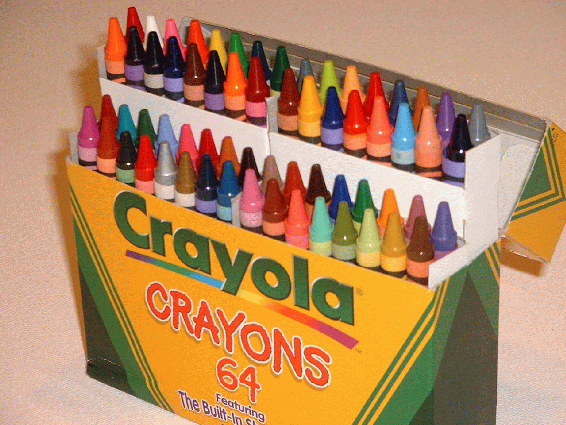
Tk::CrayolaCrayonColorPicker is a Tk::DialogBox-derived widget that allows a user to select a color from a photo of a box of 64 Crayola crayons. Nominally, one positions the cursor over the desired crayon and clicks button-1, whereupon the RGB values of the pixel under the cursor are returned. However, in reality, one can click anywhere over the photo.
Balloon help is provided, so that if the cursor lingers over a crayon, then a ballon pops up, displaying the crayon’s actual color - for instance, “robin’s egg blue.”
Because Tk::CrayolaCrayonColorPicker is a subclass of Tk::DialogBox, the widget can have one or more buttons, with the default being a single Cancel button. This functionality is provided automatically by the superclass, Tk::DialogBox.
Our widget also overrides the Tk::DialogBox::Show() method with one of its own. We do this because, by definition, dialogs are modal, which means they perform a grab. Unfortunately, balloon help does not work with a grab in effect, so Tk::CrayolaCrayonColorPicker::Show() deiconifies the color picker window itself, waits for a color selection or a click on the Cancel button, and then hides the window.
The return value from our Show() method is either a reference to an array of three integers, the red, green and blue pixel triplet, or a string indicating which dialog button was clicked.
Here’s an example, which creates the window seen in Figure 1:
    use Tk::CrayolaCrayonColorPicker;
    my $cccp = $mw->CrayolaCrayonColorPicker(-title => 'Crayon Picker');
    my $color = $cccp->Show;

    if ( ref($color) =~ /ARRAY/ ) {
        my ($r, $g, $b) = @$color;
        print "r/g/b=$r/$g/$b!\n";
    } else {
        print "no color selected, response=$color!\n";
    }
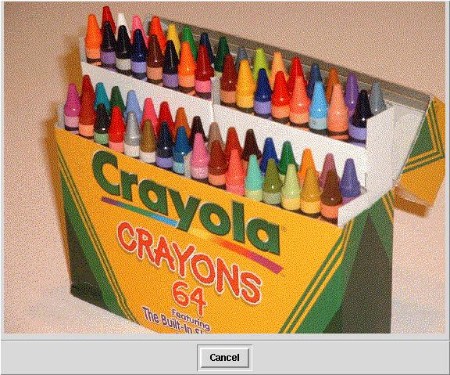
Figure 1 |
Notice the use of the -title option. Since Tk::CrayolaCrayonColorPicker is derived from Tk::DialogBox, it supports all the option/value pairs defined by its superclass, of which -title is one.
Now let’s look at the definition of class Tk::CrayolaCrayonColorPicker. I like to place the module’s version number as the first line of the file, making it easy for MakeMaker (and humans) to find it. (MakeMaker usage is also explained in Mastering Perl/Tk, Chapter 14, Creating Custom Widgets in Pure Perl/Tk.)
Next is the package definition.
Tk::widgets is a fast way to use a list of widgets. It expands to “use Tk::Widget1; use Tk::Widget2;”, and so on.
The “use base” statement is important. It tells us two things: First, that we are defining a derived widget (i.e. subclassing an existing widget), and, second, the precise widget being subclassed. Including Tk::Derived in a widget’s @ISA array is the telltale marker of a derived widget. Without Tk::Derived, the assumption is that we are creating a composite widget.
We then pre-declare a subroutine and enable a strict programming style.
The final statement in the module prologue actually defines the widget contructor name by modifying our symbol table, and performs other heavy magic, allowing us to use the new widget in the same manner as any other Perl/Tk widget.
$Tk::CrayolaCrayonColorPicker::VERSION = '1.0';

package Tk::CrayolaCrayonColorPicker;

use Tk::widgets qw/Balloon/;
use base        qw/Tk::Derived Tk::DialogBox/;
use subs        qw/pick_color/;

use strict;

Construct Tk::Widget 'CrayolaCrayonColorPicker';
A CrayolaCrayonColorPicker widget is simply a canvas with a photo of a box of Crayola crayons covering it. Since photos are objects that persist until they are destroyed, all widget instances can share the same photo. So we can create the photo from an image file once, and store its reference in a class global variable. For sizing the canvas, we keep the photo’s width and height in class variables, too.
our (
     $crayons,                  # Photo of a bunch of crayons
     $cray_w,                   # Photo width
     $cray_h,                   # Photo height
);
As part of class initialization, Perl/Tk makes a call to the ClassInit() method. This method serves to perform tasks for the class as a whole. Here we create the photo object and define its dimensions.
sub ClassInit {

    my ($class, $mw) = @_;

    $crayons = $mw->Photo(-file => 'crayons.gif', -format => 'gif');
    ($cray_w, $cray_h) = ($crayons->width, $crayons->height);

    $class->SUPER::ClassInit($mw);

} # end ClassInit
The heart of a widget module is Populate(), where we create new widget instances. A CrayolaCrayonColorPicker widget consists of a canvas with a photo of a box of Crayola crayons (taken with my handy digital camera). Clicking anywhere on the photo invokes a callback that fetches the RGB components of the pixel under the click.
Additionally, transparent, trapezoidal, canvas polygons are superimposed over the tips of each crayon, and each of these items has a ballon help message associated with it. The message indicates the crayon’s color.
sub Populate {

    my ($self, $args) = @_;
Since we are a Tk::DialogBox widget at heart, set up a default Cancel button to ensure our superclass’ Populate() has a chance to process the option list, then withdraw the window until it’s shown.
    $args->{'-buttons'} = ['Cancel'] unless defined $args->{'-buttons'};
    $self->SUPER::Populate($args);

    $self->withdraw;
Create the canvas with its photo, and store the canvas reference and the image id as instance variables. We’ll need access to both later.
    $self->{can} = $self->Canvas(
        -width  => $cray_w,
        -height => $cray_h,
    )->pack;
    $self->{iid} = $self->{can}->createImage(0, 0,
        -anchor => 'nw',
        -image  => $crayons,
    );
Define the canvas callback that fetches and returns an RGB triplet. The CanvasBind() method operates on the entire canvas, unlike the canvas’ bind() method that operates on an individual canvas tag or id.
$self->{can}->CanvasBind('<buttonrelease-1>' => [\&pick_color, $self]);
Next, create the tiny transparent trapezoids that cover the tip of the 64 crayons, and define the balloon help. When specifying balloon help for one or more canvas items, the balloon widget expects its -msg option to be a reference to a hash, where the hash keys are canvas tags or ids, and the hash values are the balloon help text.
So, we first create an instance variable that references an empty anonymous hash, then invoke the private method make_balloon_items() to do the dirty work. The method creates the canvas polygon items and populates the hash pointed to by $self->{col}. Then, we create the balloon widget, and attach the canvas and help messages. The ballon text appears next to the cursor.
    $self->{col} = {};         # anonymous hash indexes colors by id
    $self->make_balloon_items;

    $self->{bal} = $self->Balloon;
    $self->{bal}->attach($self->{can},
        -balloonposition => 'mouse',
        -msg             => $self->{col},
    );

} # end Populate
Here’s the class private method make_balloon_items(), which simply makes 64 calls to make_poly().
The 64-crayon Crayola box in divided into 4 sections of 16 crayons each. Each section contains two rows of eight crayons. These subroutine calls create each section, starting with the section’s background row, followed by the section’s foreground row.
We create the polygons items from back to front so that the canvas stacking order is back to front. This ensures that the balloon help of foreground polygons items takes precedence over background items.
For obvious brevity, most of the make_poly() calls have been removed.
sub make_balloon_items {

    my ($self) = @_;

    # 16 northwest crayons.

    $self->make_poly(132,   8, 'red');

    # 16 northeast crayons.

    $self->make_poly(306,  61, 'gray');

    # 16 southwest crayons.

    $self->make_poly(107,  97, 'brick red');

    # 16 southeast crayons.

    $self->make_poly(270, 157, 'tumbleweed');

} # end make_balloon_items
Given the coordinates of the point of a crayon, the class private method make_poly() creates a transparent polygon over the tip so we can attach a balloon message to it. The message is the crayon’s color, and is stored in the hash pointed to by $self->{col}, indexed by polygon canvas id.
The transparent stipple is important, as it allows balloon events to be seen. The fill color is irrelevant; we just need something to fill the polygon items so events are registered.
If we remove the stipple, then the polygon items covering the crayon tips become visible, as shown in Figure 2.
    sub make_poly {

        my ($self, $x, $y, $color) = @_;

        my $id = $self->{can}->createPolygon(
            $x-3, $y, $x+3, $y, $x+11, $y+38, $x-11, $y+38, $x-3, $y,
            -fill    => 'yellow',
            -stipple => 'transparent',
        );

        $self->{col}->{$id} = $color;

    } # end make_poly
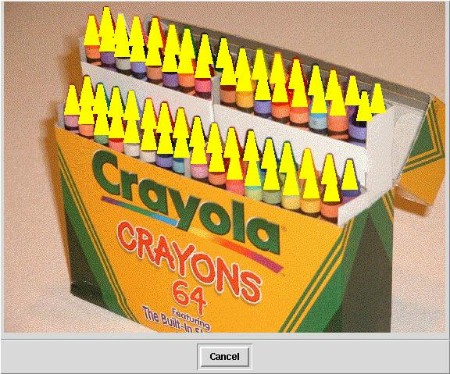
Figure 2. |
Subroutine pick_color() is our last class private method. It demonstrates a rather dubious object oriented programming technique - meddling with the internals of its superclass! But we do this out of necessity, as a workaround for the “balloons do not work with a grab” bug.
We want to override Tk::DialogBox::Show, so we need to know what its waitVariable() is waiting for. It’s this variable that the dialog buttons set when we click on them, and it turns out to be $self->{'selected_button'}.
We make pick_color() set the same variable when returning a pixel’s RGB values, thus unblocking the waitVariable() and returning the RGB data to the user.
In case you’re interested, early-on in the coding I determined the coordinates of each crayon’s point by printing $x and $y in this callback.
    sub pick_color {

        my ($canvas, $self) = @_;
        my ($x, $y) = ($Tk::event->x, $Tk::event->y);
        my $i = $canvas->itemcget($self->{iid}, -image);
        $self->{'selected_button'} = $i->get($x, $y);

    } # end pick_color
Here is our only class public method, Show(). We can’t use the standard DialogBox Show() method because the grab interferes with balloon help. So we roll our own, forgoing the modal approach. Control passes from waitVariable() in one of two ways: 1) a color is selected (see pick_color() above), or, 2), the Cancel button is activated.
    sub Show {

        my ($self) = @_;
        $self->Popup;
        $self->waitVariable(\$self->{'selected_button'});
        $self->withdraw;
        return $self->{'selected_button'};

    } # end Show
And that’s it. Until next time … use Tk;
You can download the class module, associated .GIF file and a test program that uses the new class.
O’Reilly & Associates recently released (January 2002) Mastering Perl/Tk.
Sample Chapter 15, Anatomy of the MainLoop, is available free online.
You can also look at the Table of Contents, the Index, and the Full Description of the book.
For more information, or to order the book, click here.
Tags
Feedback
Something wrong with this article? Help us out by opening an issue or pull request on GitHub